

Introduction
Every engineer knows the moment: the singer nails the take emotionally, the performance clicks, but a few notes land just shy of pitch. Do you stop them and punch in? Or do you let software lend a subtle helping hand?
That question – and the tug-of-war between performance and precision – is what gave rise to pitch-correction tools. For Waves, a company that’s been part of the digital-audio landscape since the early 1990s, Waves Tune Real-Time represents their answer to one of modern production’s trickiest balancing acts: how to correct pitch without interrupting the creative flow.
As an independent review site, Waves Plugin Reviews exists to give a clear, impartial picture of how Waves Plugins behave in real-world sessions.

Many of our readers already own Waves plugins; others are deciding where to invest next. This review sets out to explore what it’s actually like to work with Waves Tune Real-Time; what it can do, how it feels to use, the moments of friction and the things it gets right - as well as the cold hard technical facts.
Plugin Overview & Context
Released in 2016, Waves Tune Real-Time was designed as a low-latency companion to the company’s existing Waves Tune and Waves Tune LT plugins. Those older versions were (and still are) post-recording editors: you capture a take, view the notes as blobs on a piano-roll grid, then nudge them into place. Waves Tune Real-Time flips that process around. It listens and corrects as you track your vocalist (or as you mix) – much like Antares’ Auto-Tune 2026 or Logic’s built-in Pitch Correction.
Waves positioned it squarely at two markets:
- Tracking engineers who want singers to hear themselves in tune while recording; and
- Live engineers running front of house (FOH) or broadcast mixes where latency is non-negotiable.
It runs on all the major formats – AAX Native, VST3, AU – at effectively zero latency on a modern system, and supports sample rates up to 96 kHz.
CPU load is light, which makes it realistic to run multiple instances on a live rig or a tracking session.
At its core, Waves Tune Real-Time continuously analyses incoming audio, evaluates pitch, and compares it to the chosen scale or MIDI input. When it detects deviation, it applies a frequency shift to bring the note into alignment. In practice the experience feels quite organic: the correction can be so quick and unobtrusive that singers can simply sound like they’re nailing their performance, without any clue as to the processing running in the background.
Setup and First Impressions
As with most Waves plugins, installation is straightforward through Waves Central. The plugin appears in your DAW as a mono or stereo insert; there’s no external application or “region capture” process as in the full Tune editor, and the plugin is compatible with MultiRack, StudioRack, eMotion ST and eMotion LV1.
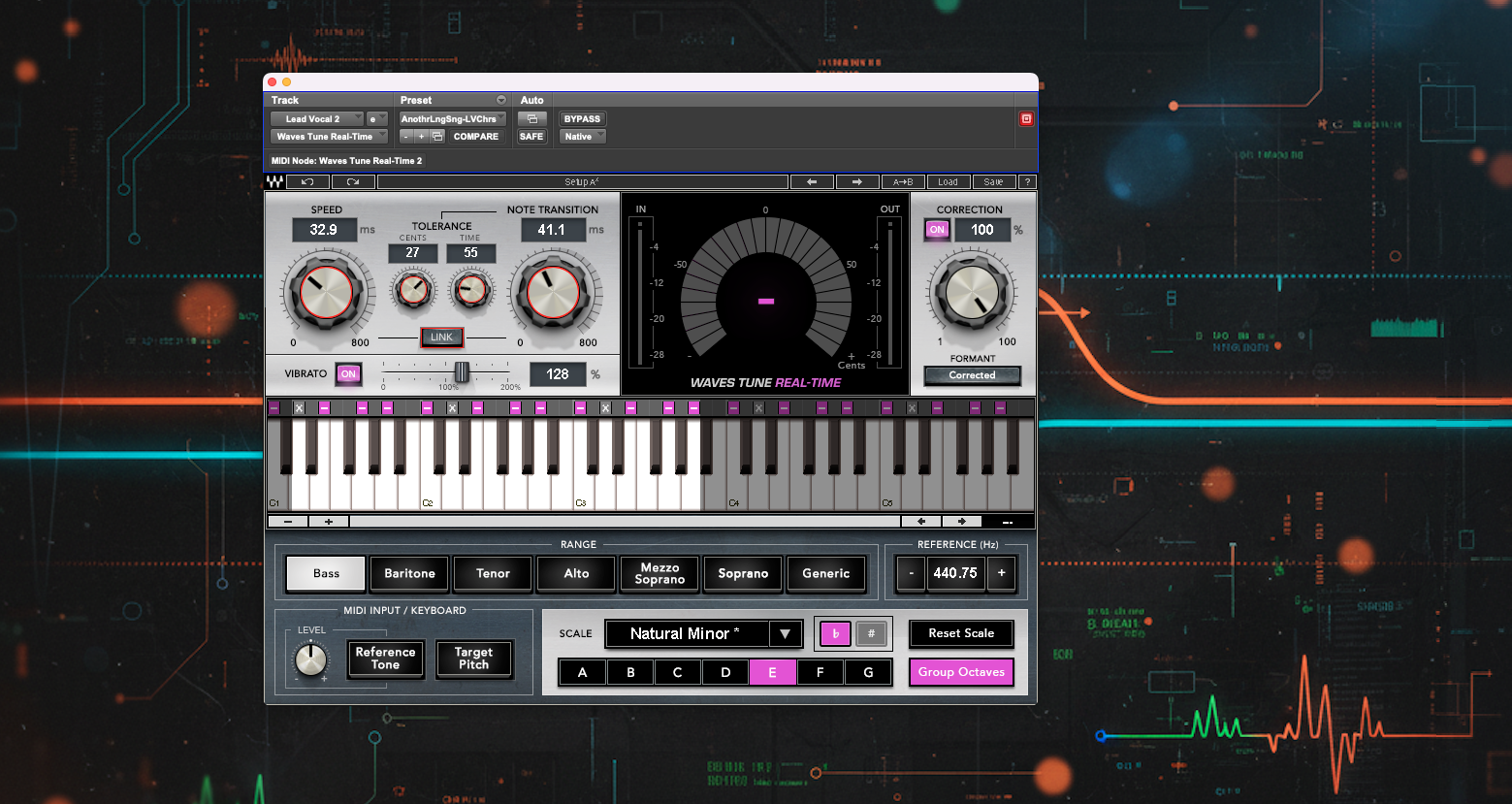
The interface looks clean and intuitive – an eye-catching display shows input and output levels, note centres and pitch drift, sitting alongside a clearly labelled, modest set of controls. Visually the plugin is very appealing; it’s easy to see exactly what the singer is doing in real time, and the tools to modify their performance are all clearly set out.
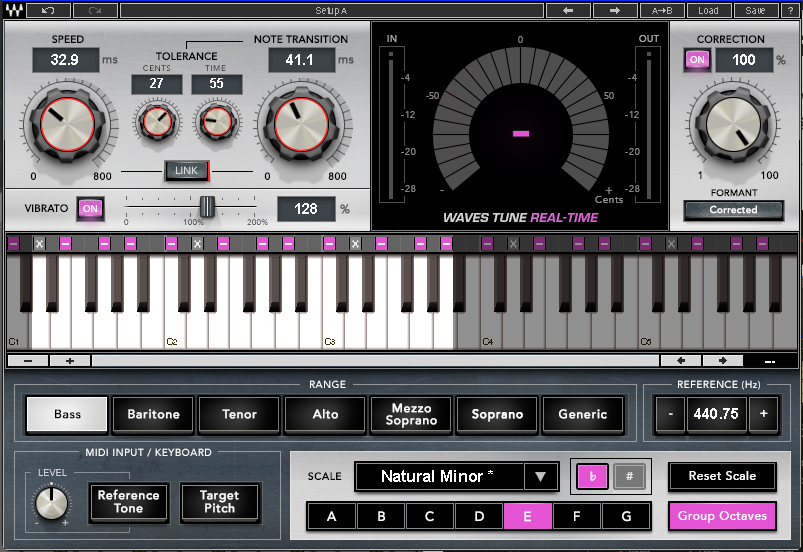
Critical controls for SPEED, NOTE TRANSITION, TOLERANCE (in CENTS and TIME), and (FORMANT) CORRECTION sit along the top section of the plugin, with the lower half given to setting up the voice type (marked as RANGE), scale selection/key, tuning reference pitch and MIDI options. You can select from over forty preset scales (major, minor, harmonic minor, Dorian, etc.) or define a Custom Scale by toggling individual notes.
Clicking on the piano keys lets you disallow notes, choose whether a disallowed note should be pitched up or down to the nearest semitone, and set the vocalist’s range. The keyboard’s a quick and intuitive way to access and configure some seriously useful functions.
Quick Start in the Studio
Insert Waves Tune Real Time on the vocal track, set the scale and key (or leave as Chromatic to leave all notes accessible to the vocalist), tweak SPEED (the reaction time of the correction) and NOTE TRANSITION (how fast the pitch glides to target), and you’re good to go. If the artist needs reassurance, you can nudge SPEED faster for a stronger effect; if they’re sensitive, slow it down.
It's worth noting how stable the plugin feels during tracking: even when automating parameters or switching scales mid-take, there are no audible clicks or re-initialisation delays, and as per Waves’ claim latency really is effectively zero - on a 64-sample buffer it’s indistinguishable from bypass.
For anyone used to manual pitch editing, the psychological difference is striking. Instead of thinking, “We’ll fix that later,” you hear the line already sitting tight. It encourages the performer and the engineer to commit to takes faster, which subtly changes the creative rhythm of a session.
Key Features & Workflow
RANGE and SCALE Control
At the bottom of the interface lies Waves Tune Real Time’s musical heart: RANGE and SCALE. These define the grid to which all incoming pitch is referenced. You can choose from common preset scales – Major, Minor, Dorian, Mixolydian, and so on – or construct your own by toggling individual notes on the virtual keyboard. If you track a singer who slides between notes in a bluesy or modal line, the ability to exclude unwanted notes, and therefore steering the pitch correction to safety, is a really useful tool.
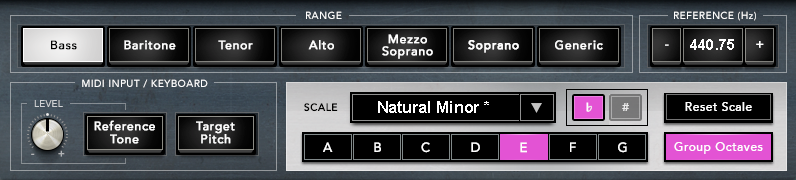
The RANGE control (selectable from Bass through to Soprano) does more than label registers – it actually adjusts the algorithm’s tracking behaviour. Restricting the range focuses the detection window and reduces octave errors, making for fewer ‘ghost jumps’ an octave down when a singer breathes or whispers: a small but important refinement that keeps live takes clean.
SPEED, NOTE TRANSITION and TOLERANCE
These three parameters form the Waves Tune Real-Time engine room:
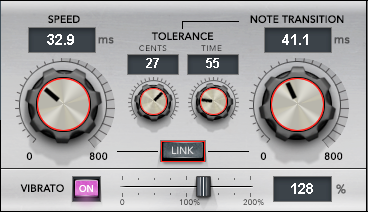
SPEED dictates how fast (in milliseconds) the detected pitch is pulled toward the target. Setting the correction circuit’s SPEED to faster values will get you closer to the familiar robotic hard-tune snap; setting it to slower values makes for a gentler transition; the correction easing in over time.
NOTE TRANSITION when a new note is detected, the NOTE TRANSITION setting governs how soon afterwards the correction algorithm circuit is implemented. It’s a kind of slew-rate limiter for pitch.
Understanding SPEED vs NOTE TRANSITION

These two controls are central to how Waves Tune Real-Time reacts to pitch movement so it's worth taking an extra moment to really get to grips with the difference, and while they’re related, they each do something distinct.

SPEED determines how fast the plugin corrects pitch once it begins responding — the sharper the setting, the quicker the note is pulled into tune.

NOTE TRANSITION affects when that correction begins — it's like a waiting period before SPEED kicks in after a new note is detected.

Think of NOTE TRANSITION as a kind of grace period:

Set it high, and the plugin waits longer before applying correction, which can help preserve expressive slides and scoops.

Set it low, and the plugin reacts almost immediately, applying SPEED’s correction right as the pitch crosses into a new note.

Together, they shape the timing and feel of correction — from transparent and natural to snappy and robotic.
TOLERANCE sets how far off a note must be, and for how long, before correction begins.
Imagine your singer is aiming for a note – but their pitch wobbles a little before locking in. That’s totally normal. The TOLERANCE controls tell the plugin:
“Don’t believe we’re hearing a new note unless you’re really sure the singer meant to sing it.”
There are two parts to this:
- CENTS = How far off-pitch are we willing to let them go,
- TIME = and how long can they drift, before we consider it a real note change?
Until either of those limits is crossed, the plugin waits – it holds the current note, even if the pitch is starting to move.
Without tolerance, every tiny pitch twitch might be interpreted as a new note – and that can lead to sudden, glitchy corrections. Tolerance makes the plugin more patient and musical:
- It filters out little pitch wobbles that happen during expressive singing.
- It over-correcting slides, scoops, and vibrato by giving the vocalist room to move naturally.
As an analogy, think of a note change as like walking through a door into a new room (a new note):
- CENTS = How far through the doorway you step, and..
- TIME = how long you linger, before we say, “Ah, you meant to walk through!”
TOLERANCE gives you the wiggle-room to hang around the doorway without being pushed into the next room.
Together these three controls are deceptively simple, but once you click with them, sculpting the behaviour becomes second nature – like riding a compressor’s attack and release until you lock it in.
Formant Correction & Vibrato Handling
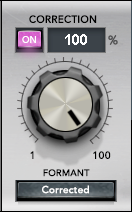
Formant shifting is vital. Without it, aggressive pitch moves can make vocals sound chipmunky or hollow. Waves Tune Real-Time includes a FORMANT CORRECTION toggle that helps preserve timbral integrity when large corrections occur. For subtle tightening it’s less critical, but if you’re using heavy correction keeping it engaged maintains realism.
Formant Correction: a detour into vocal physics

When we speak or sing, our vocal cords generate a fundamental frequency - the pitch - which is simply the rate at which they vibrate. But that pitch alone doesn’t make a sound recognisably human, or uniquely you. The voice gains its rich tone from resonances in the vocal tract - the throat, mouth, and nasal cavities - which shape the harmonic overtones that ride atop the fundamental.

These resonances are called formants.

You can think of formants as the acoustic fingerprint of the vocal tract, the unique peaks in energy that occur at specific frequencies when air passes through the shaped space of your mouth and throat. It’s these formants - not pitch - that let us tell the difference between an “ah” and an “ee,” or between your voice and mine, even when we’re singing the same note.

Now, when a simple pitch-correction plugin shifts the fundamental pitch of your voice, it typically shifts everything - including the formants - upward or downward together. This introduces a problem.

Without formant correction, raising a vocal’s pitch also raises the formants. The result? A voice that sounds unnaturally small or chipmunk-like. Conversely, lowering pitch pulls the formants down, making the voice sound oddly hollow, as if it’s emerging from a deep cave. The timbre of the voice becomes distorted, changing its identity.

Formant Correction decouples the pitch shift from the formants. The plugin corrects the pitch - moving it up or down - while leaving the formants in place, or gently repositioning them to retain a natural vocal tone. It’s a bit like retuning the strings on a cello without reshaping the body of the instrument. You change the note, but preserve the character of the soundbox.

In practical terms, formant correction helps your voice stay yours even when pitch-shifted. It maintains realism, intelligibility, and emotional integrity. Without it, pitch correction is detectable not by the pitch itself, but by the unsettling mismatch between pitch and vocal identity.
Rounding out the top section’s controls is the VIBRATO switch and slider. Waves Tune Real-Time’s treatment of vibrato is particularly good.

VIBRATO ON/OFF Switch
- ON: Preserves the singer’s natural pitch wobble (vibrato or flutter).
- OFF: Flattens pitch completely for a more robotic or ‘locked-down’ sound.
VIBRATO depth slider (with VIBRATO switch to ‘ON’ : 0–200%, default: 100%)
- 100%: Keeps vibrato as sung.
- 0%: Removes vibrato – pitch is flat.
- Over 100%: Adds extra wobble – exaggerating the vibrato.
MIDI INPUT / KEYBOARD
One of Waves Tune Real-Time’s more creative features is its MIDI control option.
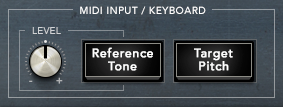
When Target Pitch is selected, the plugin follows incoming MIDI notes instead of using an internal scale. For electronic producers and mix engineers, this opens the door to vocoder-like pitch manipulation – you can effectively ‘force’ the vocal to follow a MIDI melody. For live engineers, it enables a keyboard player to guide the tuning in real time during a performance.
The Reference Tone switch puts the keyboard into ‘play’ mode and lets you sound out notes by clicking the keys; useful for giving vocalists entry notes and so on.
And Finally..
Rounding out the controls is the REFERENCE (Hz) calibration panel.
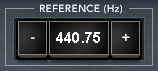
This sets the plugin’s overall tuning reference – usually 440 Hz, which is the standard pitch for A4. But if a singer or backing track was recorded to a different reference (like 432 Hz or 442 Hz), you can match it here.
It adjusts the centre of all pitch correction up or down, helping the plugin stay in tune with instruments or sessions that aren’t tuned to standard concert pitch.
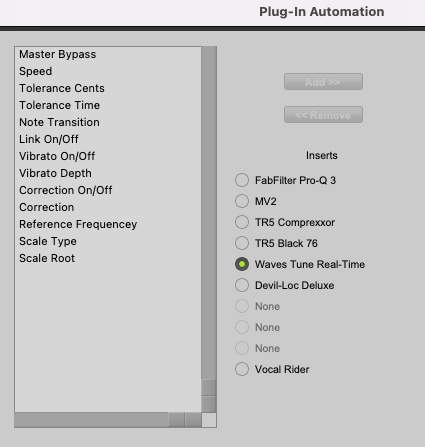
Automation within the DAW is solid. You can draw lane curves for Speed, Note Transition, Tolerance (Cents and Time), and plenty of other functions, creating dynamic correction profiles – subtle in verses, tight in choruses. It’s not something every user explores, but in the right situation can be invaluable.
The Hands-On Experience: Waves Tune Real-Time In Use
So what’s the plugin like to use? How does it behave in a session? When the vocalist is in cans, the talkback is live, and you’re making judgment calls second-by-second, is it dependable, effective and intuitive?
Setup Flow
From launch to first usable result, Tune Real-Time is fast. Insert, set the key, tweak a couple of knobs and you’re up and running. That immediacy is great for the room; singers who’ve previously fought with tuning anxiety tend to relax and grow in confidence once they hear themselves “in pocket.”: their shoulders drop and their intonation steadies.
The GUI responds well during tracking; the real-time pitch trace is readable but not distracting, and if you’ve ever used Melodyne or Waves Tune (the offline versions), the difference in cognitive load (as you’re listening rather than editing) is dramatic.
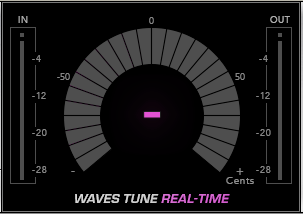
There’s something satisfying about the latency-free feel too. There’s no psychoacoustic lag, and so you forget there’s processing happening; and for the vocalist it just feels like a better version of themselves coming back through the cans.
Adjusting SPEED or NOTE TRANSITION mid-phrase works without hiccup; the correction just re-voices itself, and when you ride the parameters while recording, you can ‘perform’ (to some extent) the correction – easing transitions manually, shaping the character of the tuning in real time.
The Learning Curve
Yes, it’s easy to get up and running quickly with Waves Tune Real-Time — the controls are well laid out, clearly labelled, and the plugin feels responsive and intuitive. But like any expressive tool, mastery takes time. There’s a surprising amount to be tweaked under the surface, and getting to grips with its full depth is a gradual process.
At first, I found it tempting to push the Speed and Note Transition settings too hard — chasing tightness, but ending up with robotic results. The real sweet spot often lies slower than you’d expect, and it takes a bit of trial and error to find the right musical balance.
That’s when the plugin’s musicality really starts to shine. It doesn’t just drag pitch to centre – it interprets the shape of what’s being sung. Slides, scoops, and expressive gestures are often treated as intentional, not errors, meaning you spend less time correcting the correction. Once I’d attuned my ears and spent time experimenting, I realised how much power and nuance the plugin actually offers.
Behaviour Under Pressure
In a busy tracking session, reliability is everything. Waves Tune Real-Time proved stable on my rig; Pro Tools 2022.10 on Mac OS Monterey. Automating parameters or change scales between takes never caused any problems, and, as you would expect, session recall is instant, with all settings reloaded correctly.
One small improvement I found myself wishing for mid-session is visual feedback granularity; the main pitch trace wheel could use a slightly higher resolution, and the ability to ‘slow down’ the readout by having it fade slower could really help; when you’re fine-tuning vibrato tolerance, or trying to get a better handle on which controls need a little tweak, the display sometimes feels coarser than the ear, and the info that’s there can be a little hard to interpret on the fly. It’s a very minor gripe, but worth noting.
Sound Quality and Comparisons
Used gently, the sound is transparent enough that you can forget the plugin’s active. There’s no perceptible phase smear or high-frequency loss, (issues that occasionally crop up in older pitch-shifters), ‘S’ and ‘T’ sounds remain crisp with excellent phase coherence, and sustained vowels retain their tonal body rather than collapsing into the hollow ‘bottle-like’ quality that can define some of the less sophisticated pitch processors of the past.
Push it harder and, of course, tuning artefacts do emerge, (like the slightly glassy stepping sound), but they’re to be expected at those levels of correction, and sometimes they’re just what you want!
Every pitch tool exists on a spectrum from transparent corrector to creative effect. Waves Tune Real-Time sits comfortably toward the transparent end but can cross into effect territory with fast settings. Its correction curves are slightly less aggressive than Auto-Tune’s at equivalent speed values; this gives it a marginally softer edge that some describe as “more musical,” others as “less snappy.”
If you already own Waves Tune or Tune Lite, the overlap depends on your workflow. They’re best viewed as complementary rather than redundant: use Waves Tune Real-Time for tracking confidence and gentle polish in the moment; switch to Waves Tune for manual fine-tuning later. You lose note-by-note control in exchange for speed, fluidity, and the ability to perform with the correction live – and that shift alone may change how and when you choose to use tuning.
CPU Load and Session Scale
Measured in a large session (26 mono instances on an ageing Mac Pro), average CPU load for the entire session, including all the other plugins, was hovering around 40% – 50%. That’s impressively efficient, meaning you can comfortably run it across multiple vocal channels or even live on a broadcast console without fear of overload.
Value and Market Position
Pricing and Perception
Like most Waves products, Tune Real-Time’s price tag is a moving target. On paper the list price hovers around $200, but anyone even casually familiar with Waves’ pricing model knows that’s largely nominal. In reality, it frequently appears on sale for $49.99.
That volatility skews perception. At full price, it competes head-to-head with Antares’ Auto-Tune Pro, Synchro Arts RePitch, and Celemony Melodyne Assistant – all of which offer more granular control and longer feature lists. At the typical sale price, however, it becomes almost absurdly good value: you’re getting a robust, low-latency pitch-correction engine with professional reliability for less than a night out.
The danger, of course, is that such constant discounting can make a solid professional tool look like a casual toy. That’s a marketing issue rather than a technical one, but it’s worth acknowledging. Many first-time buyers underestimate what Waves Tune Real-Time is capable of simply because it’s so often on sale.
Target Users
There are really three groups who will feel the benefit most clearly:
- Tracking engineers and producers – anyone who records vocals daily and wants to maintain flow without endless retakes. Waves Tune Real-Time can really work well here, acting like a safety net without creative interference.
- Live and broadcast engineers – the ultra-low latency makes it viable in monitor or FOH chains where every millisecond matters.
- Producers working fast – creators who build tracks in tight timeframes will appreciate how this plugin allows “good enough to commit” vocals that can still be polished later.
For purely offline editors, or those who already rely heavily on Melodyne or RePitch for detailed line-by-line surgery, it’s less essential. But for everyone else it fills an increasingly common role.
Stability and Longevity
Long-term reliability is good. Tune Real-Time has survived multiple OS and DAW transitions since its release, and Waves has consistently updated it to maintain compatibility through Apple Silicon and current Windows builds. CPU efficiency and stability both remain strong in 2025.
The only caveat is the same one that applies to all Waves software: you’ll occasionally need to think about the Waves Update Plan if you move to a new operating system. That’s not a flaw of the plugin but a reminder of the realities of long-term software maintenance – a subject we cover elsewhere on this site in detail.
Verdict
Waves Tune Real-Time is one of those plugins that hides its sophistication behind apparent simplicity. It isn’t showy, it doesn’t have animated 3D curves or auto-learned phrasing models, but get to know it and it quickly starts to feel invaluable: my go-to, quick-fix pitch correction tool.
Pitch correction has moved from being a guilty fix to a standard part of vocal production. Tools like Waves Tune Real-Time bridge the gap between technology and performance, quietly enabling creativity rather than dictating it.
Used tastefully, it can make an uncertain vocalist sing with confidence. Used aggressively, it becomes an instrument in its own right. Either way, its job is to serve the performance – and in that respect, Waves Tune Real-Time does its work with quiet competence.
At its best, it makes you forget it’s even there.
Quick Links
The plugin is currently on sale for $49.99, available on its own or bundled as part of Waves Essential and Ultimate Subscription plans, the Vocal Production suite, and other Waves software bundles:
https://www.waves.com/plugins/waves-tune-real-time
The excellent manual can be downloaded here:
https://assets.wavescdn.com/pdf/plugins/tune-real-time-v16-update.pdf